
14 Best Survey Software in 2026 (Paid & Free Options)

In this article, we cover the top survey software platforms (both paid and free) to help you choose the right tool for your research needs.
Understanding Free vs. Paid Survey Software
What “Free” Really Means
When we refer to “free survey software,” we’re talking about platforms that offer free plans for surveying your own audience. However, if you need to purchase survey respondents from the platform’s audience panel, that will always require payment.
Limitations of Free Plans
- Limited questionnaire design: You may not have access to advanced question types, sophisticated conditional logic, or other essential survey design features.
- Basic analytics only: While you may get simple charts and raw response data, you likely won’t have access to advanced filtering capabilities, statistical testing, or the ability to create multi-variable charts in your brand’s colors.
- Usage restrictions: Free plans may limit the number of surveys you can create or cap the total responses you can collect.
Key Capabilities to Evaluate in Paid Survey Platforms
When comparing paid survey tools for surveying your own audience, prioritize these essential capabilities:
Data Quality, Pricing & Turnaround
- High audience data quality: Poor respondent quality will compromise even the best-designed surveys.
- Transparent pay-per-response pricing: Avoid platforms with high monthly fees regardless of usage.
- Fast turnaround time: The platform should deliver results quickly, so you’re not waiting weeks to collect responses and can move forward with decisions in a timely manner.
Platform Capabilities
- Sophisticated questionnaire design tools: You should be able to build surveys with advanced question types (e.g., such matrix questions, conjoint analysis, or multimedia elements), implement complex skip logic and branching, and never compromise on survey design. Even minor design limitations can compromise data quality.
- Advanced audience targeting: The platform should offer granular demographic and behavioral filters that enable you to reach both general population audiences and hard-to-reach, specialized groups, ensuring you engage the right participants for any research objective.
- Robust analytics and reporting: Choose a platform that offers advanced data filtering capabilities and enables you to create multi-variable charts with custom branding and built-in statistical testing — all within a few clicks. This eliminates the need for time-consuming data exports and external analysis tools.
Top Survey Software Platforms: Paid & Free Plan Options
With these criteria in mind, here are the leading survey platforms, including several with free plan options:
- Pollfish
- Qualtrics
- SurveyMonkey
- Suzy
- Alchemer
- Typeform
- SmartSurvey
- Mentimeter
- LimeSurvey
- Google Forms
- Microsoft Forms
- QuestionPro
- Survicate
- SurveySparrow
1. Pollfish
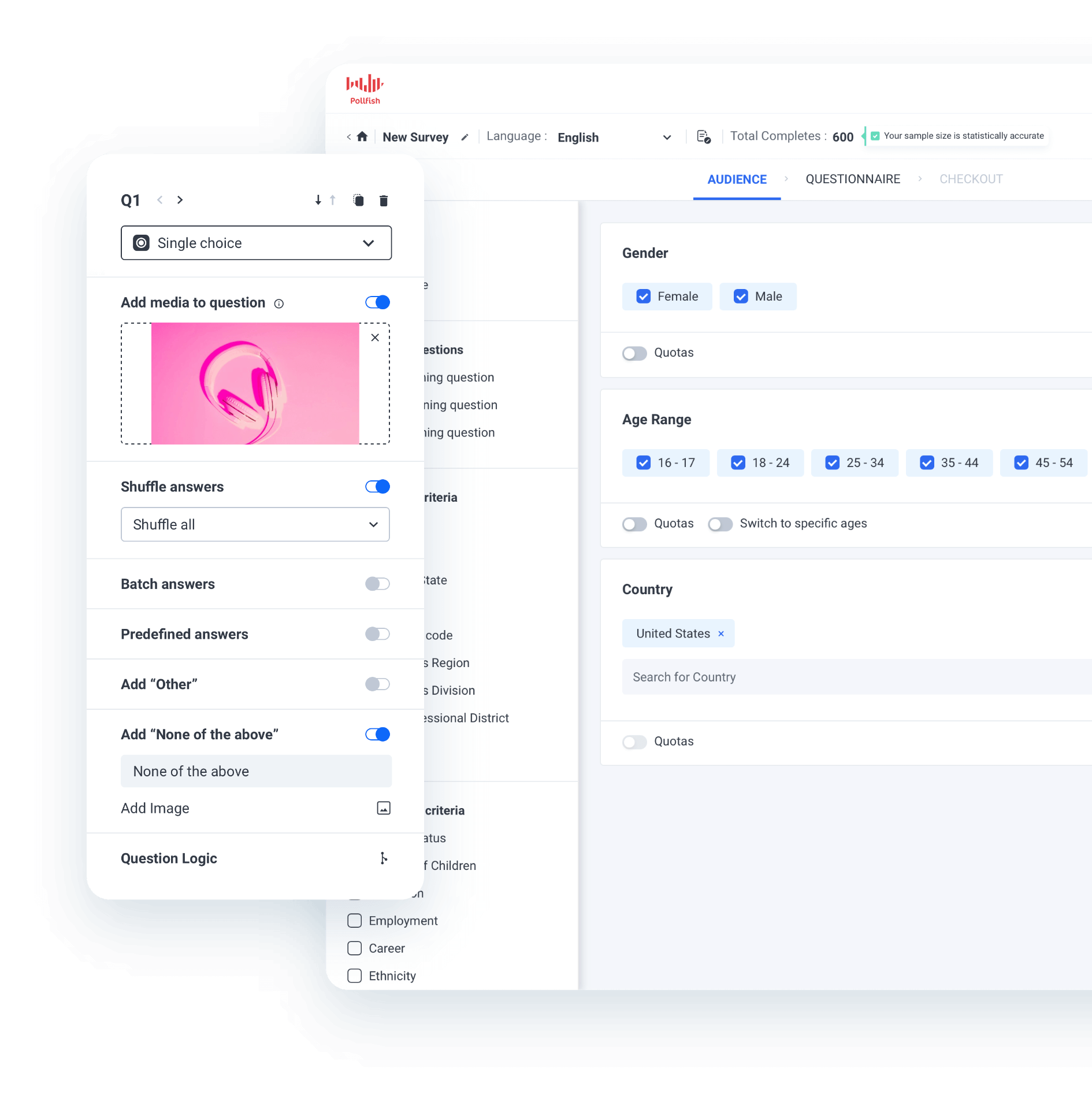
With Pollfish, our market research platform, you can run surveys using two methods:
- Free option: Create a survey link and send it to your own audience via email, social media, or other channels.
- Paid option: Buy survey responses from our panel of respondents. Learn about our rigorous data quality measures, which ensure reliable results.
Up next, we’ll discuss key reasons you should choose Pollfish over competing survey tools.
Note: Sign up for a free Pollfish account, no payment information required. We also invite you to inquire about our full-service market research services through our parent company Prodege, which can help with the entire process, including survey design, audience targeting, data analysis, and reporting.
High-Quality Audience Data You Can Rely On
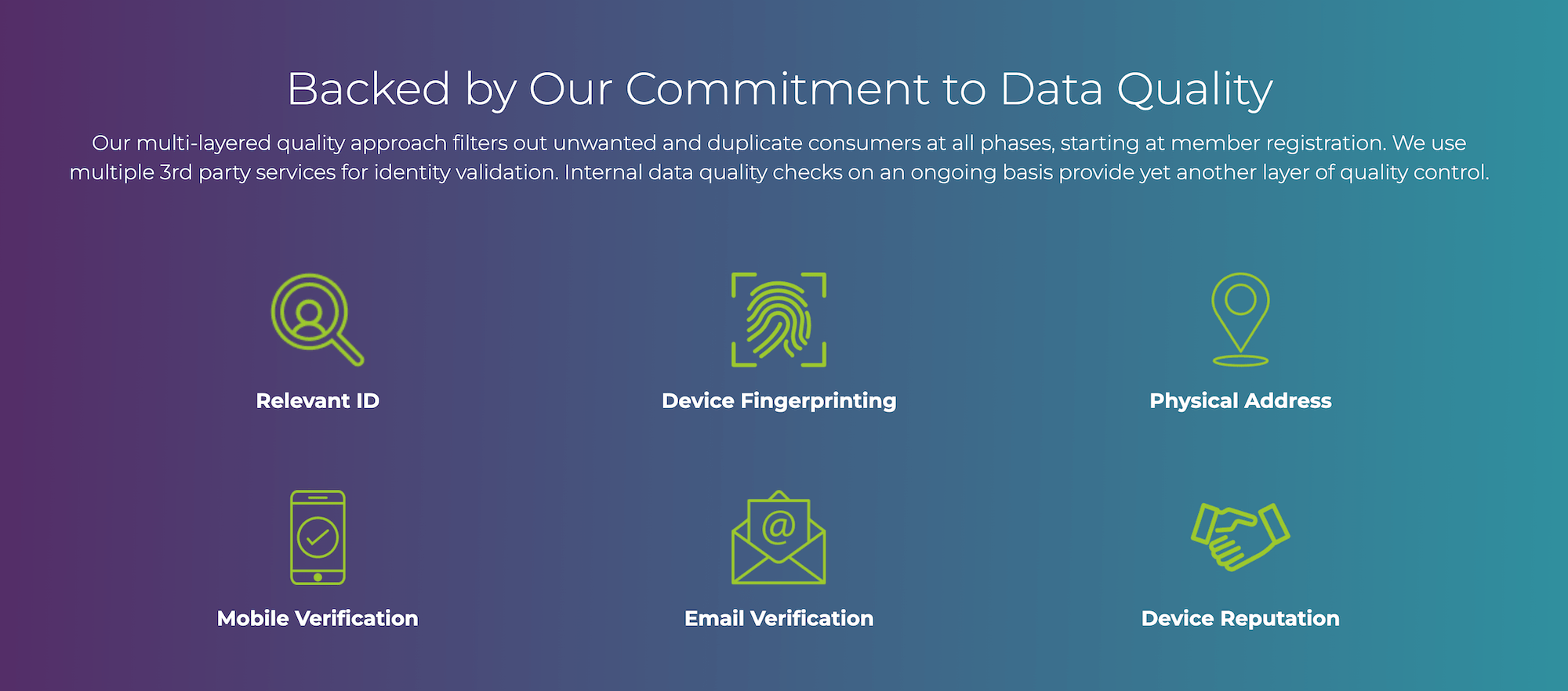
Even the best-designed survey can produce unreliable data when fraudsters or bots participate, or when respondents rush through surveys and provide careless answers without detection mechanisms in place.
At Pollfish, through parent company Prodege, we’ve put extensive time and resources into developing rigorous data quality standards. We have a 40-person Panel Support, Security, and Compliance Department dedicated to this, and our recent article, 3 Survey Data Quality Issues Sabotaging Your Research (& How We Fix Them), explores common data quality challenges and the specific solutions we use to address them.
Let’s take a look at some of our quality control measures:
❇️ 14-Day Evaluation Period
New panelists aren’t allowed to participate in client surveys immediately. Instead, they go through an initial two-week evaluation period, during which they complete a series of internal quality checks. Those who don’t meet our standards are removed, while those who pass continue under ongoing spot checks throughout their time on the panel.
❇️ Dynamic Trust Scores
Every panelist is assigned a dynamic “Trust Score” that updates over time using AI and machine learning. This score reflects their consistency, engagement, and response quality. Low scores may trigger additional verification steps or result in removal, while high scores open access to more surveys.
❇️ Behavioral Data Validation
Self-reported profile information often becomes outdated as people’s lives change, leading to poor targeting accuracy. Pollfish addresses this by combining profile data with real behavioral signals like shopping receipts and online activity patterns.
For instance, if a respondent lists their household as vegetarian but regularly submits receipts for meat products, we may flag this for review. This ongoing validation ensures audience attributes remain accurate and up to date.
❇️ Fraud Detection Technologies
We layer multiple defenses to stop fraudulent respondents before they ever enter your dataset. These include:
- CAPTCHA
- Device ID Reputation
- 100% Double Opt-In
- Carrier/targeting alignment check
- Single user IDs
- Sophisticated anti-VPN measures
And much more.
❇️ Manual Review of Open-Ended Responses
Our team manually reviews open-ended responses to identify not only nonsense or one-word replies, but also responses that appear legitimate on the surface yet lack genuine insight — like generic answers copied from elsewhere, responses that don’t actually address the question, or feedback that shows minimal thought despite seeming complete. These low-effort responses are removed, ensuring you receive authentic, thoughtful feedback.
As several of our customers shared on Trustpilot:
“The most important point to make is that I trust the responses of my survey. My target audience was very specific and I could tell that the responses were legitimately coming [from] subjects in my target audience.”
“Each time I use this service I am blown away by the speed with which the responses come in and with the detail which most of them include. You can tell that the respondents take this very seriously. They must really enjoy doing it.”
Fast Survey Results with Pollfish’s Large, Engaged Respondent Communities
Because we work with a proprietary first-party audience network, you can get responses from hundreds or even thousands of people much faster than competitors.
For a general US audience survey on a broad topic with high incidence (e.g., adults 18–64), Pollfish can often gather 500+ responses within hours.
More niche, targeted audiences (e.g., parents of newborns who own electric vehicles) will typically come back in just a few days.
As some of our customers shared on Trustpilot:
“I needed a 25 question survey answered, and was able to get 500 completed surveys in 8 hours with Pollfish. The presentation of the results is very impressive and the demographics information Pollfish provided is invaluable.”
“The thing that amazes me most is how quickly you can get your data results back. So fast! Usually in a couple of hours.”
“I’m amazed at how quickly the platform was able to deliver rich, segmentable data from over 500 respondents. I had feature-ready insights in only 3 days.”
“I’ve used Pollfish before so when I needed to test concepts for a new business pitch in 5 countries over the holiday, I turned to Pollfish. The surveys were easy to set up, allowed me to select my very specific target and launched right away. Within a couple of days I had my results in an easy to interpret, actionable format well within my budget.”
Transparent, Pay-per-Response Pricing with No Hidden Fees

Pollfish uses a pay-per-response model to help keep your costs low without subscriptions, hidden fees, or extra charges for more user seats.
❇️ No long-term contracts or minimum spend
With Pollfish, you only pay for the survey responses you use. You won’t be locked into a long-term contract or required to pay a minimum amount.
❇️ See your total cost update in real time as you build your survey
Your cost breakdown is always displayed in real-time as you build your survey, starting at a base cost of $0.95 per response.
As you add targeting filters, your price will update. Per the above example, adding two filters (household income and pets in household) adds a charge of $0.55 per filter, for a total of $2.05 per response. For 600 responses, the total cost is displayed upfront as $1,230.
❇️ Add unlimited seats for free
Pollfish offers unlimited user seats at no extra cost. Whether you’re a small team or a large organization, everyone who needs access can create surveys or review results without limitations.
As several of our customers have stated on Trustpilot:
“The dollar amount they quote you in their cost calculator tool, and the number they show when you’re developing the survey, is the number you pay. I was burned multiple times by [competitor] charging me unexpected amounts and making it difficult to quit an expensive subscription. I’m so happy to have found Pollfish as an alternative. Their support team also responds VERY quickly to chat messages and has been tremendously helpful the few times I had questions.”
“The pricing is clear and transparent from the beginning. The results come quickly and can be downloaded in different formats and with different filters. What we like most is the ability to filter the results and analyze them separately for each segment. We highly recommend this platform.”
“They charge based on the completed response. It is very fair and transparent. As a researcher, I have used many survey platforms, but they are the best so far.”
Advanced Survey Features & Functionality
It’s important to choose a survey software that has the necessary functionality to address your research needs. You should never have to compromise on your goals due to software limitations such as:
- A lack of advanced question types, branching logic, or other essential survey programming features.
- A lack of the necessary targeting criteria, requiring you to settle for a broader audience that doesn’t match your target respondent profile.
- No built-in analysis tools to filter results, create custom charts (using multiple variables), utilize custom branding, and more.
Let’s take a look at how Pollfish’s easy-to-use survey software avoids these limitations, focusing on capabilities in these three areas:
- Sophisticated questionnaire design
- Advanced audience targeting
- Robust analytics and reporting
Note: Many customers choose Pollfish’s DIY option to create and launch their own surveys, but if you prefer, our research experts can run the entire project for you with our full-service offering (fulfilled through parent company Prodege).
Sophisticated Questionnaire Design
Pollfish offers a wide range of flexible survey design tools, allowing you to program and customize questionnaires to meet your specific goals and requirements.
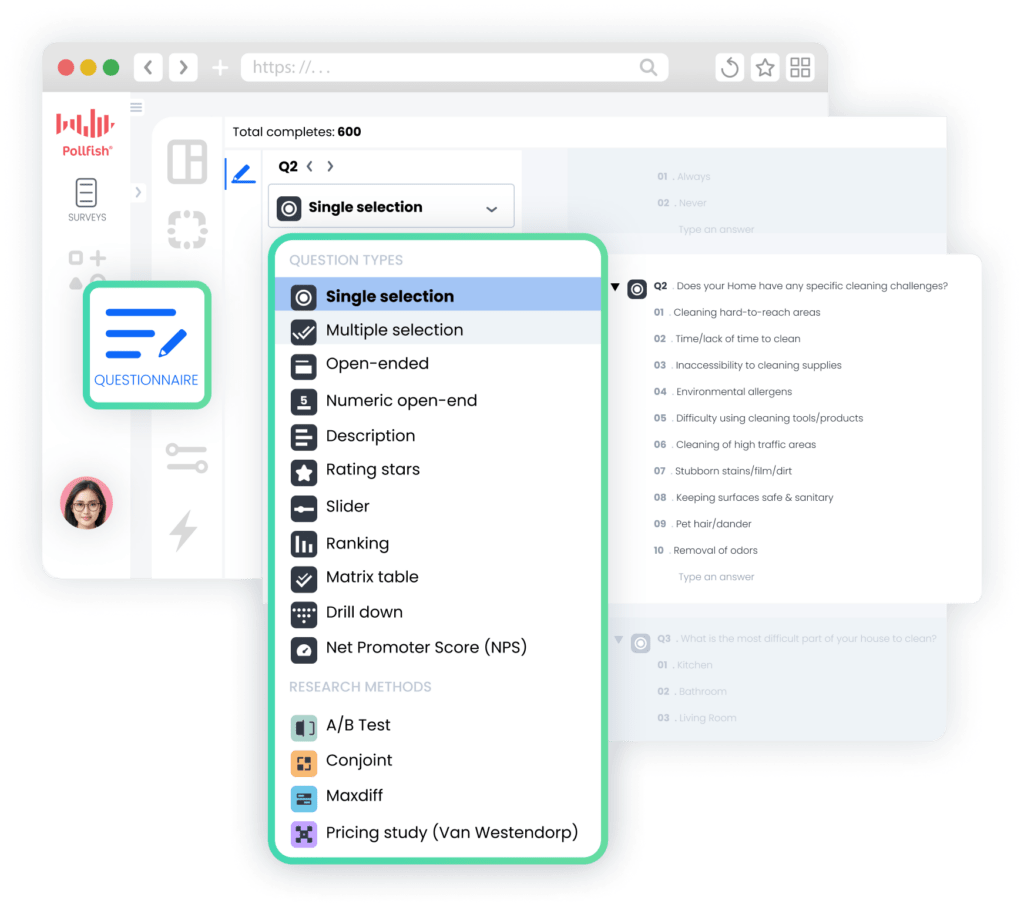
❇️ 16 Question Types
You can choose from 16 question types, ranging from simple ones to more advanced types like:
- Conjoint Analysis
- MaxDiff (Maximum Difference Scaling)
- Pricing Study (Van Westendorp)
- Net Promoter Score (NPS)
- Constant Sum
- Ranking and Matrix Table
- A/B Testing
Note: Explore the full list of question types here.
❇️ Advanced Questionnaire Design Features
Advanced survey design features Pollfish offers include:
- Skip Logic Branching
- Screening Questions
- Answer and question shuffling
- Mutual Exclusions
- Survey Preview & Advanced Controls
Note: Explore Pollfish’s additional survey design capabilities here.
Advanced Audience Targeting
Pollfish’s advanced targeting options allow you to reach the exact survey audience you need, whether broad (e.g., U.S. adults 18–64) or hyper-specific (e.g., avid outdoor enthusiasts who recently purchased camping gear).

❇️ 6 Main Targeting Options
We offer over 50 targeting filters from 6 categories:
- Demographics: Age, Gender, Hispanic Origin, Marital Status, Languages Spoken, Education Level, US Voter Registration, Household Income (US), Age & Gender of Child(ren) in Household, Type of Home, Pets in Household, Political Party Support, Hispanic Level of Acculturation, Parental Status / Pregnancy Status, Race, Device Type, Device Operating System (OS), Ethnicity, Number of Children in Household
- Geographic Criteria: US State, US Division, US DMA, US Region, US Statistical Area (CBSA), US County, US Zip Code
- Consumer Lifestyle: Beverage Consumption, Hobbies & Interests, Sports Participation, Gambling Participation, Music Streaming Services Use, Movie Theater Frequency, Home Movie Viewing Frequency, Video Game Participation, Video Game Consoles, Video Game Genres, Travel by Air for Business/Leisure, Vehicle Make/Brand Own or Lease, Vehicle Type Own or Lease, Health Ailment Diagnosis
- Employment & Occupation: Employment Status, Industry Work In, B2B Department, Number of Employees, Job Title
- Behavioral Data: Brands Purchased (In-Store), Online Shopping: Retailer, In-Store Shopper, Category Buyers, Retail Channels Shopped (In-Store), Websites Visited, Retail Channels Shopped (Online)
- Media: Video Streaming Services Used
❇️ Audience Quotas for Balanced Samples
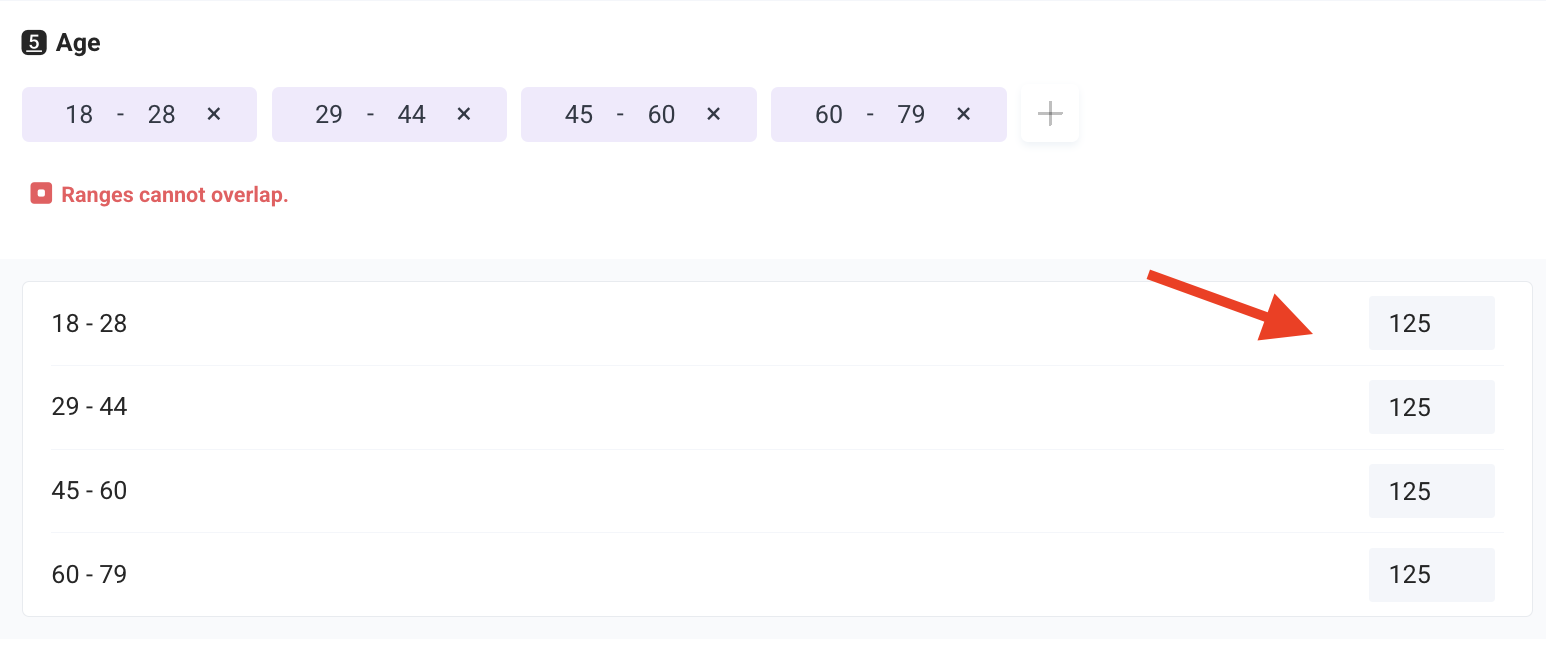
Setting audience quotas ensures your findings remain representative across segments like age, region, income, and so on. For example, you might set quotas to capture equal input from millennials and Gen X, rather than letting one group dominate the results.
❇️ Targeting Through Purchase Receipts
Because Pollfish (through parent company Prodege) directly owns and manages its respondent communities, we can capture valuable behavioral data, such as uploaded purchase receipts. This allows for precise targeting based on verified consumer actions rather than relying solely on self-reported preferences or demographic assumptions.
For example, if you want to survey people who recently bought plant-based meat alternatives, Pollfish can identify and reach those respondents based on actual receipt data, ensuring your survey is completed by the exact consumers you’re interested in.
Robust Analytics and Reporting
Once responses begin to roll in, you can analyze them in real-time right within the Pollfish platform, in just a few clicks.
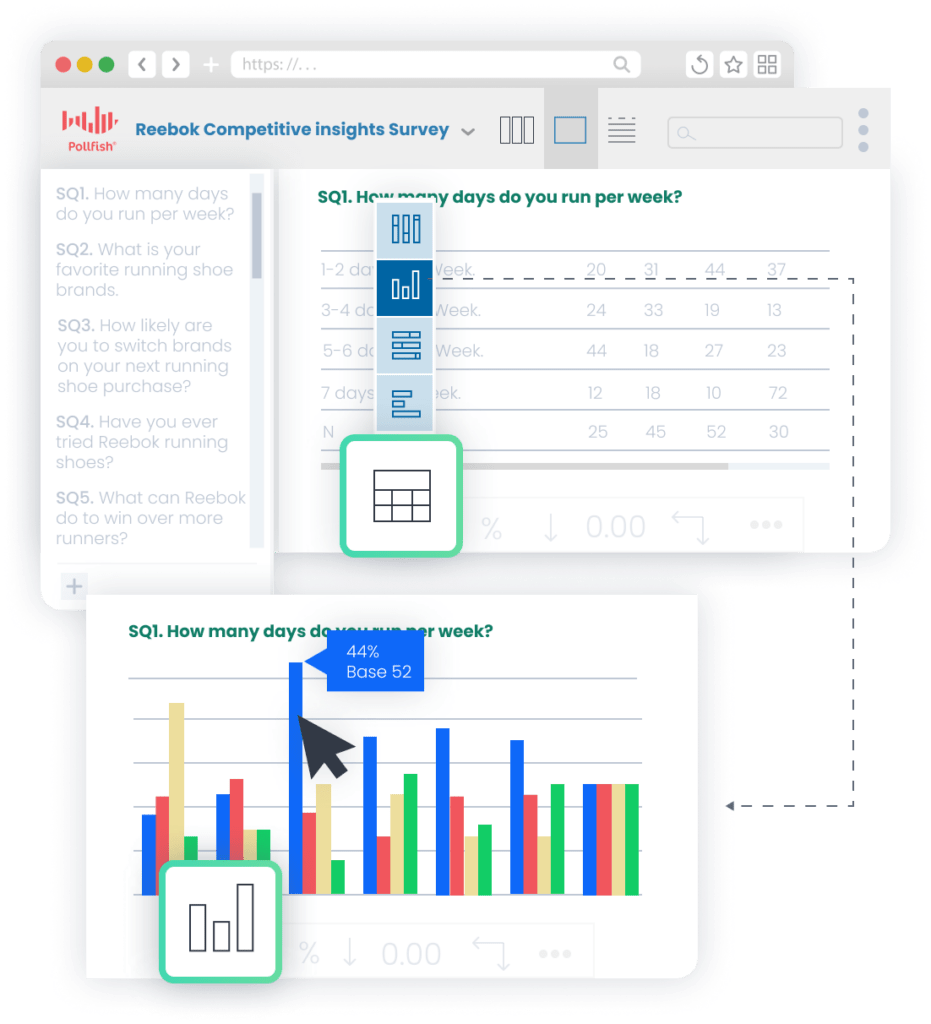
❇️ Automatic chart creation
Pollfish automatically selects the best chart type for each survey question, whether that’s a bar graph, pie chart, table, or another format.
❇️ Targeted insights through filtering
Pollfish makes it easy to dig deeper into your data and surface relevant insights:
- Filter by survey responses: Focus only on those who gave particular answers, such as filtering to show only respondents who report using your product daily.
- Filter by audience segments: Refine your results to a specific group, like parents with young children, while excluding others, to identify trends unique to that demographic.
❇️ Multi-variable analysis and visualization
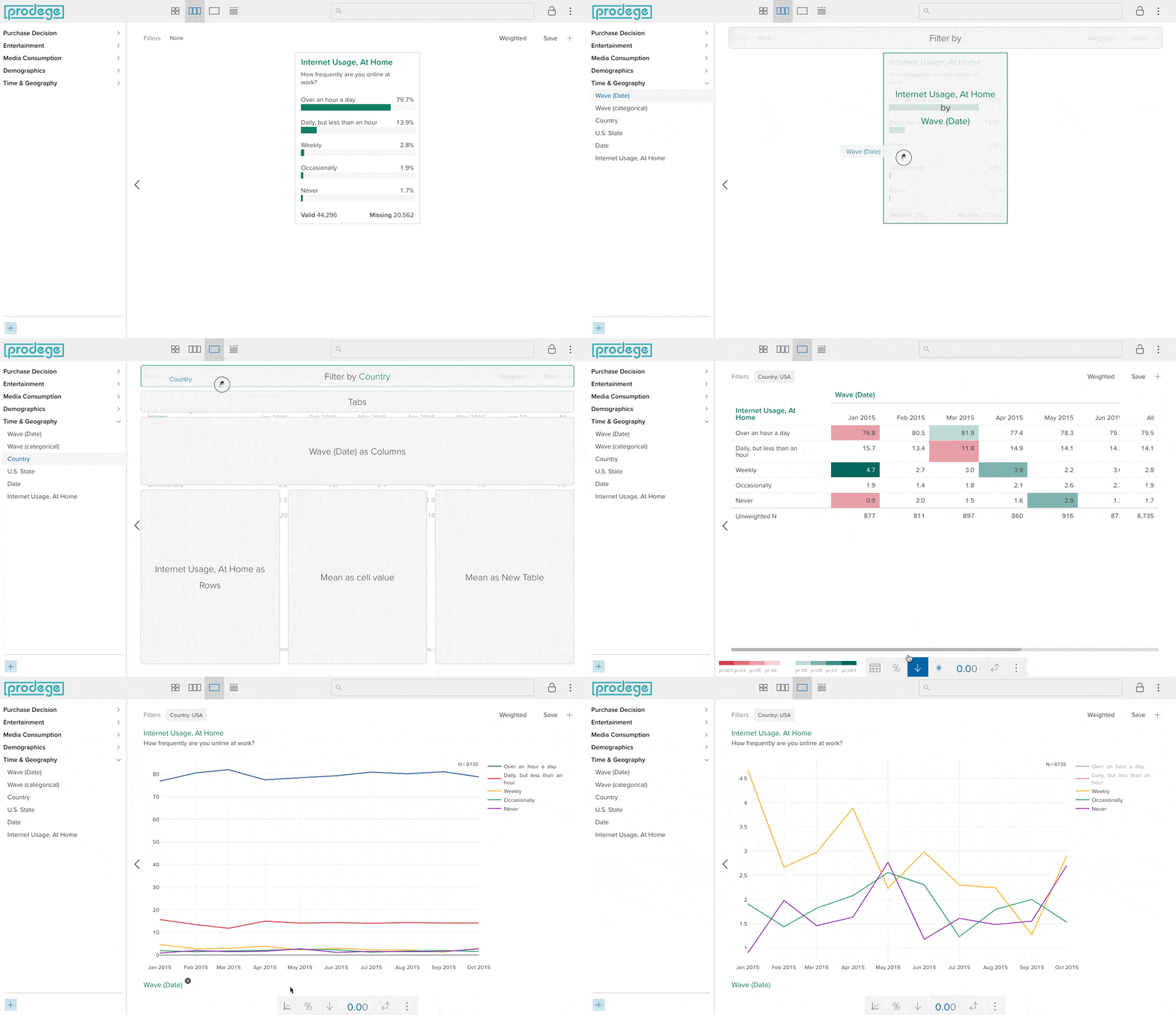
Pollfish’s Insights Builder (available for large-scale research needs and full-service projects) lets you easily create sophisticated custom charts that combine multiple variables (e.g., income, location, age, and behavior) in just a few clicks. It’s incredibly intuitive and user-friendly, as shown in the illustration above, and eliminates the need for complicated external analysis tools.
❇️ Statistical significance testing
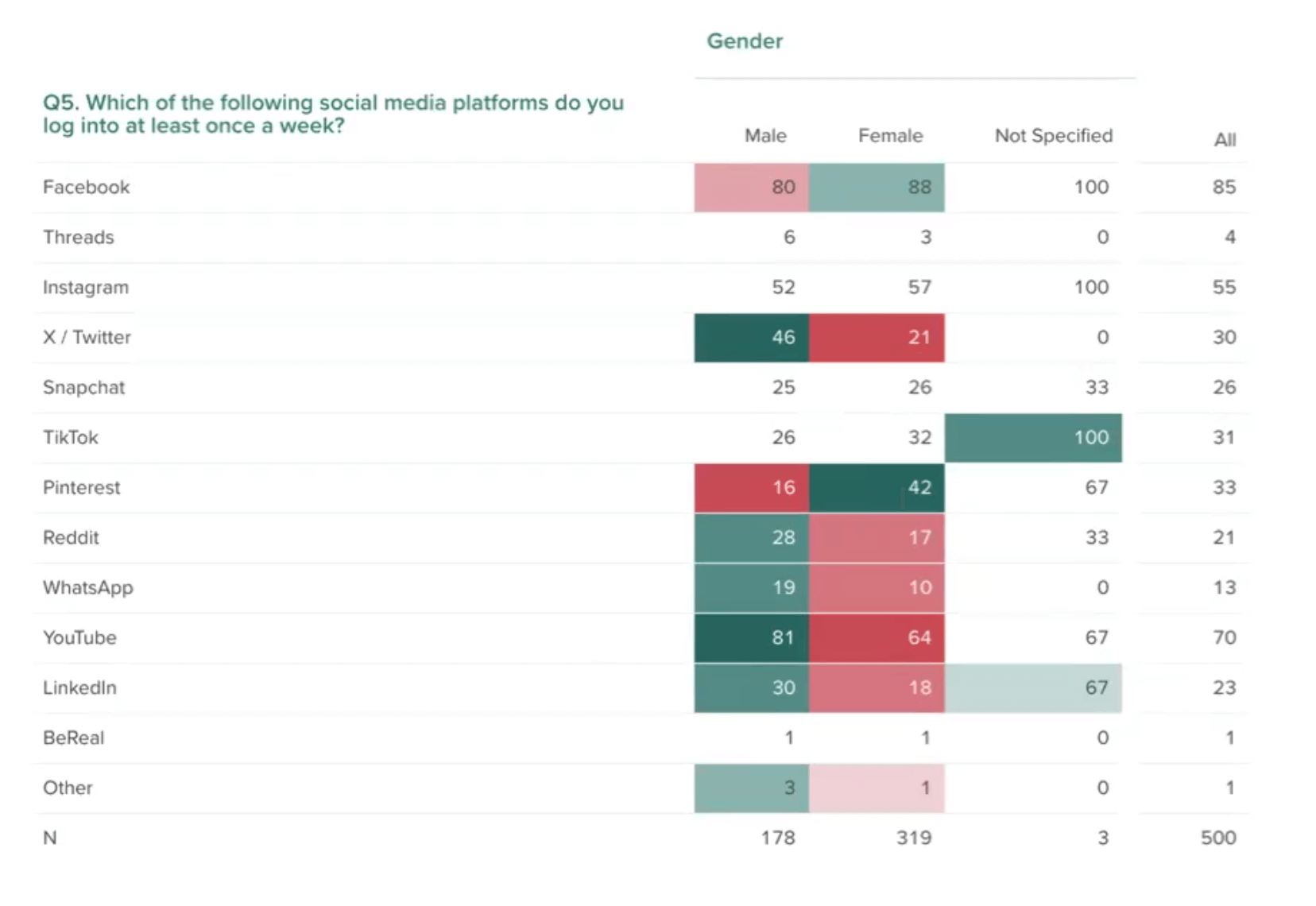
Statistical significance testing results are presented in a straightforward way, with differences highlighted through color coding and letter-based notation.
For example, in the chart above showing weekly social media use by gender, Pollfish highlights significant gaps: males report logging into X/Twitter at much higher rates (46%) compared to females (21%), while Pinterest shows the opposite pattern, with females (42%) using it far more than males (16%).
❇️ Built-in presentation builder
Pollfish lets you create and export presentation decks (similar to a PowerPoint presentation) right from the platform. This streamlines your workflow and makes it simple to drop charts directly into reports without switching between multiple tools.
❇️ Flexible export options
Pollfish provides a variety of export formats for your results, including PDF, Excel, Crosstabs, and SPSS, giving you flexibility in how you share and analyze your data.
Learn More About Pollfish’s Survey Tool
To get started with Pollfish’s survey software, we invite you to:
- Create a free account (no credit card required).
- Inquire about our full-service offering fulfilled through our parent company, Prodege.
2. Qualtrics

While Qualtrics is a paid survey platform, they also offer a free plan.
Qualtrics’ key features and capabilities break down into three categories:
1. Customer Experience
- Voice of Customer
- Omnichannel Experience Management
- Digital Experience Analytics
- Website & App Feedback
- Location Experience Hub
- Online Reputation Management
- Contact Center Analytics
- Quality Management & Compliance
- Agent Coaching
- Edge Instant Insights
2. Employee Experience
- Employee Engagement
- Employee Pulse
- Employee Research
- Candidate Experience Management
- Employee Onboarding & Exit
- 360 Development Feedback
- Employee Retention Analytics
- Continuous Employee Listening
3. Strategy & Research
- Strategic Market Research
- Product Research
- Brand and Communication Research
- User Experience Research
- Edge Audiences
Here are several reviews from Qualtrics’ customers on Trustpilot:
“I enjoy using Qualtrics for survey research, and also use it for creating smart, interactive forms for people to complete online. It’s got a lot of programability, and it’s extensible with CSS, and Javascript. If you are an SPSS user, you will love the binary SPSS files you can download directly and have all missing values and labels already defined. Also, Qualtrics has an integrated mailer which will track your surveys in such a way that it’s always convenient to send reminders (or thank you messages) to all non-respondents (or respondents).”
– Brian
“Qualtrics is an excellent technology to support my research efforts. It facilitates the design and field work when survey methodologies are implemented. It also is the most efficient way to gather data from remote cities, making my consulting work timely and facilitating my survey design and interviewing.”
– Carlos R.
“I researched ‘survey’ platforms for over 12 months before deciding to take on board Qualtrics. I’m only a small firm – but we have a huge impact working in the Disability Sector and Health Sector. Using Qualtrics I’ve been able to design appraisal programs that are suitable for participants to complete. This means that people with disability (and their carers) at long last can have a say on the services they need. The assistance from Qualtrics has been unbelievably professional and value add. What more can you do when you know you will positively impact lives.”
– Gordon J.
“I am the Qualtrics brand administrator for our university. Qualtrics is an excellent company. Their customer service is extremely fast and friendly. Their online resources of videos and tutorials are very helpful. Qualtrics is an amazing tool with advanced capabilities that works well in higher education.”
– Vincent
Note: To learn how Pollfish compares to Qualtrics, see this article.
3. SurveyMonkey
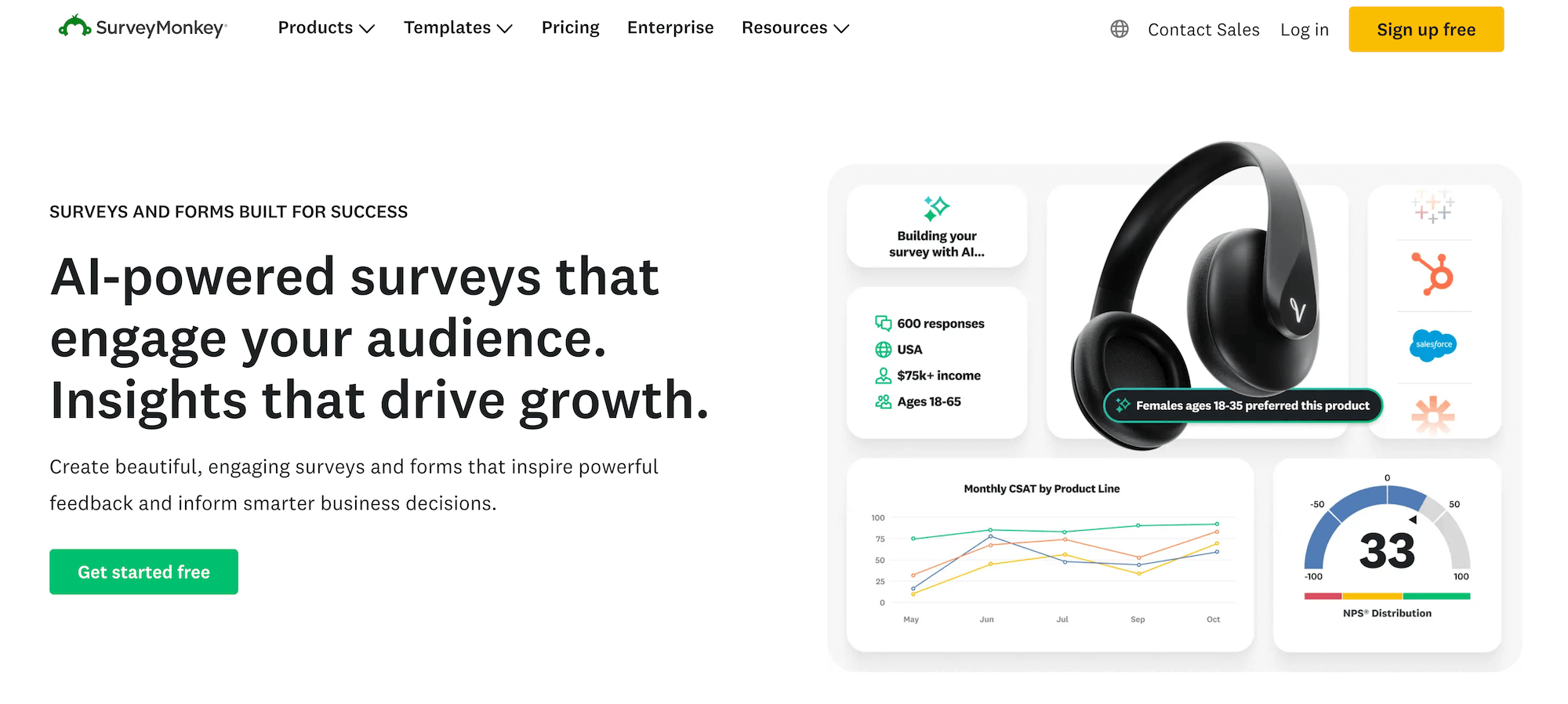
SurveyMonkey is a paid survey software that offers a free basic plan.
Some of their key features and capabilities include:
- SurveyMonkey Genius for AI-powered survey creation
- Customizable survey templates
- Survey branching and skip logic
- Response quotas
- A/B testing for better decision making
- Survey branding and theme customization options
- Custom URL survey links
- Mobile device survey options
- Flexible data collection options (email, web link, social media)
- QR code survey features
- Real-time results tracking
- Real-time insights
- Sentiment analysis tools for open-ended responses
- Integrations with 100+ platforms, including CRMs like Salesforce or HubSpot, tools such as Mailchimp, Zapier, and more
- API options
Here are several reviews from SurveyMonkey’s customers on G2:
“What I like best about SurveyMonkey is how simple and user-friendly it is. It makes it easy to create professional-looking surveys, customise questions, and share them with others without needing any technical knowledge. The results are also presented clearly, which makes it convenient to understand responses and gather useful feedback quickly.”
– Deepak M.
“I use SurveyMonkey to conduct NPS studies for customer satisfaction, and it records this in a systematic way. I like how the platform displays results in bar charts, making it visually appealing. I’ve been using it since 2018, and it was my first tool of choice. Designing surveys with SurveyMonkey is something I enjoy, especially because the platform handles the mathematics of counting averages and presents the data in a good visual format. Setting up SurveyMonkey was easy, and I find it quite user-friendly.”
– Ramin E.
“What I like best about SurveyMonkey is its ease of use and flexibility. It allows us to quickly create professional surveys, gather feedback efficiently, and analyze responses through clear reporting and dashboards. The platform makes it easy to understand participant feedback, identify trends, and make data-driven improvements to our training programs. I also appreciate the types and customization options available to create engaging and effective surveys.”
– JoJo T.
Note: To learn how Pollfish compares to SurveyMonkey’s online survey software, see this article.
4. Suzy

Suzy is a survey platform with solutions for:
- Attitudes and Usage
- Tracking
- Feature Testing
- Package Testing
- Price Testing
- Positioning
- Message Testing
- Path to Purchase
- Retailer Sell-in
- Heatmapping
Here are several reviews from Suzy’s customers on G2:
“I use Suzy for product development to test new ideas before launching. It helps eliminate uncertainty by showing exactly what an audience likes or dislikes with actual data, rather than just gut feeling. I really like the “Real-Time” feature, which lets me launch a survey and get responses almost immediately. This is crucial for tight deadlines, as I can get validated answers in hours instead of waiting weeks. Suzy Live is another standout feature, allowing seamless transitions from text surveys to 1-on-1 video interviews or digital focus groups, handling all the logistics like scheduling and paying participants. The immediate validation I get is invaluable, as it prevents wasting time on ideas that won’t work. Additionally, the “White Glove” onboarding process ensured my team was well-supported when getting started.”
– Harshit V.
“What I like most about Suzy is how it democratizes consumer insights for creative teams — putting real-time feedback directly in the hands of designers, not just researchers. Before Suzy, I was completely dependent on our strategy team or external agencies for consumer testing. I’d hand off my work and wait days or weeks for a report. Now, I can field my own concept tests and see results in hours. That autonomy is liberating. I iterate immediately. I learn faster. I present with confidence. Suzy’s monadic testing capabilities help eliminate bias by presenting different brand concepts one at a time to targeted audiences. No side-by-side confusion. No order bias. Just clean, comparative data.”
– Evaine L.
“The interactive format completely bypasses the “survey fatigue” we usually get from parents and teachers. Instead of clicking through sterile multiple-choice grids, respondents actually engage with the platform in a conversational way. This gives me raw, unfiltered qualitative feedback on whether our digital learning platforms actually make sense pedagogically, not just technically. Also, I don’t need to beg IT to help me configure audience targeting. The dashboard is incredibly intuitive; I can spin up a compliance check for a specific K-12 demographic in minutes. It feels less like enterprise software and more like a tool built for actual educators.”
– Putaski L.
Overall, it’s a solid survey platform and offers GDPR features.
Note: To learn how Pollfish compares to Suzy, see this article.
5. Alchemer
Alchemer is a paid survey platform, and they also offer a free trial.
Some of Alchemer’s key features and capabilities include:
- Advanced customization
- Logic and branching
- Advanced question types
- Multichannel deployment
- Instant reporting
- Easy segmentation
- Automation workflows
- Data security and protection
Here are several reviews from Alchemer’s customers on G2:
“The level of customization Alchemer offers is really impressive. We’ve been able to build some pretty complex survey flows with skip logic and branching that would of been impossible in simpler tools. The interface is fairly intuitive once you get the hang of it, and the reporting dashboards are genuinely useful for sharing results with stakeholders. Integration with our existing tools was also smoother then expected.”
– Nolan T.
“The UI is very user-friendly, and the drag-and-drop functionality is genuinely helpful. I also like the range of integrations it offers, such as with CRM tools, which makes syncing data straightforward. Overall, Alchemer offers reasonable pricing for its services.”
– Maris B.
“I use Alchemer Survey as part of my training development team to collect feedback from learners on various trainings. I like that it allows us to create survey questionnaires tailored to our training needs, whether they are open-ended questions or rating-based. This flexibility helps us gather detailed feedback by collecting ratings on specific aspects of the training as well as descriptive feedback about the instructors. Additionally, it generates comprehensive reports for all learners in a specific training, making analysis straightforward. Setting it up was also very easy.”
– Surabhi N.
Note: To learn how Pollfish compares to Alchemer, see this article.
6. Typeform
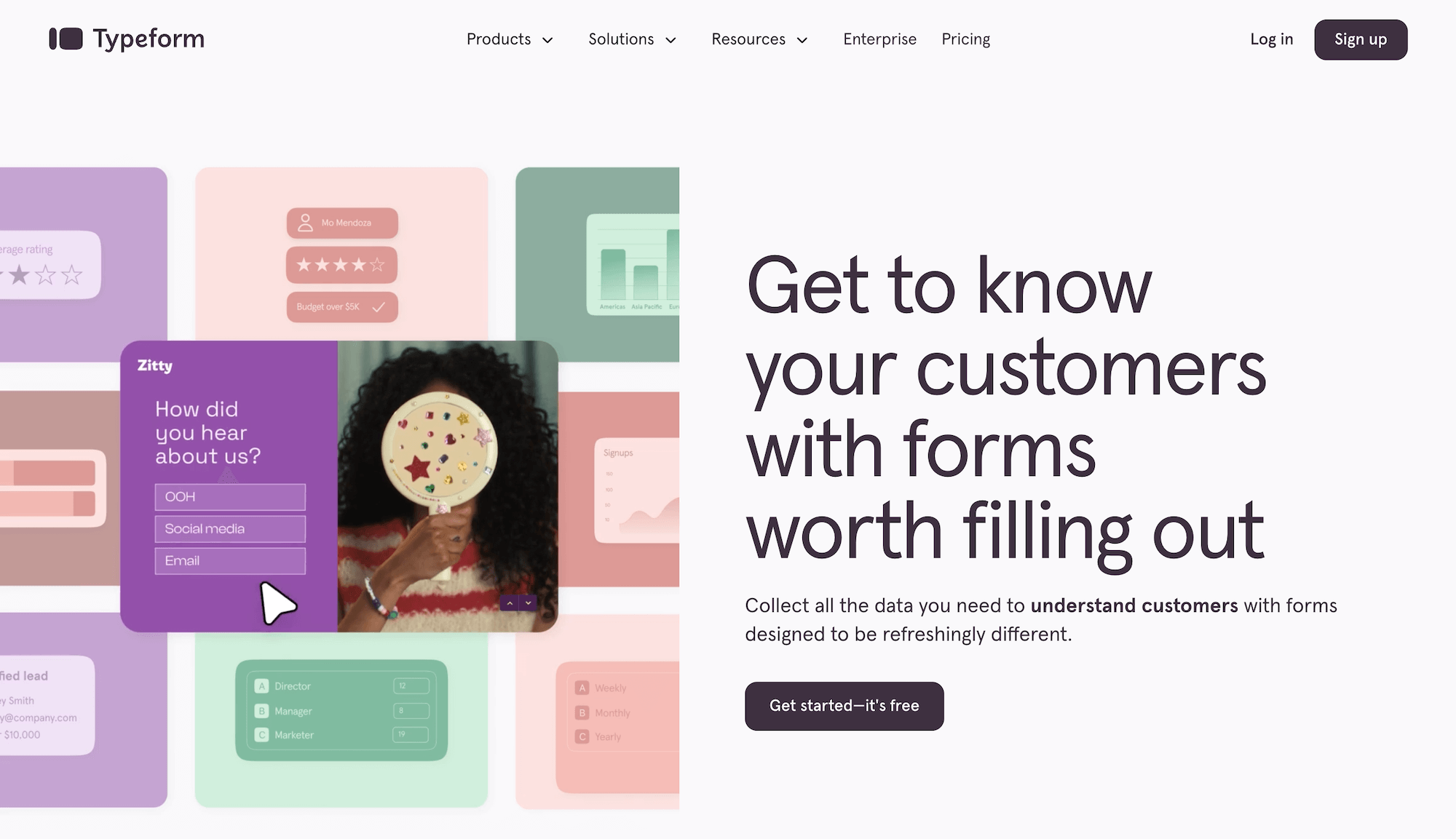
Typeform is a paid online form platform with a free plan.
Some of their features and capabilities include:
- Form builder
- Survey maker
- Quiz maker
- Test maker
- Poll builder
- Application form builder
- Landing page builder
- NPS form builder
- Registration form builder
- Short form builder
- Flexible embed options
- Analytics tools
Here are several reviews from Typeform’s customers on G2:
“What stands out to me is how professional the forms look without spending much time on design. As someone who works on graphic design, websites, and interior design projects, I often need to collect project details before starting work. The conversational layout feels less overwhelming than traditional forms, so clients are more likely to complete every question. I also like the flexibility to add logic, customize branding, and embed forms directly into websites, which keeps the whole process organized.”
– Muzammil M.
“What I like most about Typeform is its conversational form experience and intuitive interface. Unlike traditional forms that can feel overwhelming, Typeform presents one question at a time, making the experience more engaging and user-friendly. Clean, modern interface that encourages higher form completion rates. Easy drag-and-drop form builder with no coding required. Conditional logic for creating personalized form flows. Integrations with CRM, marketing, and productivity tools. Real-time response collection and analytics. For me, the most valuable feature is the conditional logic. It allows forms to adapt based on a user’s answers, creating a more personalized experience while collecting only the most relevant information.”
– Ravindra N.
“It’s really easy to use and sort of gets out of the way, which is exactly what I need from it… AI features are helpful, especially in regard to question language and logic, and again, aren’t in your face like many other platforms seem to be – it feels like I’m in control and not forced into using AI for everything which I like.”
– Matt R.
Overall, it’s a solid tool for collecting customer feedback.
7. SmartSurvey
SmartSurvey is a paid tool with discounted plans for students and non-profits.
Some of their key features and capabilities include:
- Basic question types
- Advanced question types
- Question customization
- File uploads
- Rich media questions
- Survey logic
- Survey branding
- Survey design
- Survey distribution
- Invitation management
Here are several reviews from SmartSurvey’s customers on G2:
“I like that you can get a free account and can still get good detailed information in Word. My one suggestion for improvement is if you can set a limit on the number of responses. The free account only allows 100 responses per month, so if you can set that limit ahead of time, it would make it so if they are not in the first 100 that participants do not waste their time.”
– Verified User
“The tool has been very detailed and complete, we have not had any problems regarding its operation, the tool has also been able to use this service to carry out the surveys in a very simple and simple way either to create, modify or send them since with this service It can be distributed, it also offers us a panel to observe those surveys sent and receive both positive and negative responses from customers, which in turn will help us to improve areas or certain points of the company, I liked Very much this very simple tool, simple and without the need for external help to use it.”
– Aurelio G.
“SmartSurvey is easy to use and it’s simple to put together surveys with varied question types and options. There’s a surprising amount of functionality hidden away behind a fairly straightforward interface. Experiences with the support and customer services teams have always been positive, and there’s a basic free membership tier.”
– Ben T.
8. Mentimeter
Mentimeter is a survey software with both free and paid plans.
Some of their key features and capabilities include:
- AI Menti builder
- Live polling
- Word cloud
- Quiz
- Survey
- Presentations
- Q&A
Here are several reviews from Mentimeter’s customers on G2:
“I love this platform for its ability to create polls. I love the interactive presentation of this platform. This platform can be used for interactive sessions with audiences which makes presentations more entertaining and attentive. The word cloud of this platform also assists in brainstorming with the audience. Other than this we can also get feedback using the open ended feature. I love the Q&A feature as it allows the audience to prioritize the question so that the majority of the question wanted by the audience is answered. I love the performance of this platform.”
– Konjengbam M.
“Using Mentimeter is straightforward and effective, more so for both the participants and the presenters and no application installation required. The presentation that Mentimeter makes is completely interactive, and it includes quizzes, live polls, and word clouds. The program captures real time feedback from participants and this makes us capture honest insights on time”
– Luciana S.
“I really like the active participation features in Mentimeter, including polls, graphs, and diagrams, as well as the anonymization of opinions. These features have been incredibly valuable in my seminars at the university. They allow students to feel confident to share their opinions without the pressure of being identified, which enhances engagement and class discussions. Mentimeter’s interactive features also provide greater connectivity in class, enabling more meaningful interactions.”
– Ghufrane D.
9. LimeSurvey
LimeSurvey is an online survey tool with paid and free plans.
They serve the following use cases:
- Academic Research
- Course Evaluation
- Customer Experience
- Customer Satisfaction
- Employee Experience
- Employee Motivation
- Event Planing
- Market Segmentation
- Market Research
- Patient Satisfaction
- Product Pricing
Here are several reviews from LimeSurvey’s customers on G2:
“It helps me collect and organize feedback in a more structured way. I work as a Dietician & Nutritionist, manage a homeopathy clinic, and also create health education content. I often need surveys for health awareness activities, educational programs, and audience feedback, so having a flexible survey platform is useful. What I like most about LimeSurvey is the variety of question types available. Features such as single choice, multiple choice, ranking, rating scales, text responses, numerical inputs, and file upload options make it possible to collect different kinds of information depending on the project. This flexibility helps when creating both simple feedback forms and more detailed surveys.”
– Ishan S.
“It is open source and can be self-hosted. In terms of functionality, it supports a wide range of question types and logic. Another important feature for our organization is that it supports Arabic and other languages.”
– Philip D.
“It offers extensive customization opportunities, from editing the font of a specific question to setting up question branches and validation. This has allowed my organization to tailor surveys to not only be branded but also ensure we are not stymied by system limitations.
– Mark B.
Overall, it’s a great survey platform and can be utilized for customer satisfaction surveys and other use cases.
10. Google Forms
Google Forms is a completely free survey platform.
Some of their key features and capabilities include:
- Flexible form sharing options via email, social media, and more
- Intuitive drag and drop functionality
- Templates, flows, and quizzes
- Branding
- Optional export to Google Sheets
11. Microsoft Forms
Microsoft Forms is a free tool that can be used to run online surveys.
Some of their key features and capabilities include:
- Customizable forms
- Automatically generated reports
- Excel exports
- Microsoft 365 integration
Here are several reviews from Microsoft Forms’ customers on Capterra:
“Overall, my experience with Microsoft Forms has been very positive, allowing me to create and distribute surveys, quizzes, and other forms with ease. The user-friendly interface and seamless integration with other Microsoft tools have made it a go-to solution for my team, with only occasional minor issues with formatting.”
– Daniel C.
“My experience has been positive for straightforward surveys and internal business use, but I’ve run into limitations as projects become more sophisticated. It’s a solid tool for basic needs, though organizations with more advanced requirements may find themselves looking for alternatives.”
– Michael O.
“Microsoft Forms is easy to use and allows me to create surveys quickly with a clean and intuitive interface. The integration with Excel and other Microsoft 365 tools makes data collection and analysis very convenient. It works smoothly across devices, which makes responding and reviewing results accessible anywhere.”
– Enamul F.
12. QuestionPro
QuestionPro is a survey software with free and paid plans.
Some of their key features and capabilities include:
- Multilingual surveys
- Customizable thank you page
- Survey panel integration
- Email reminders
- Real-time dashboard
- Security and Compliance
Here are several reviews from QuestionPro’s customers on Capterra:
“My overall experience with QuestionPro has been positive. The platform makes creating and distributing surveys straightforward, and it offers a good variety of question types and templates. Data collection is reliable, and basic reporting is easy to use. However, the interface can feel a bit unintuitive for complex surveys, and some advanced analytics features are only available in higher-tier plans. Overall, it’s a solid tool for standard survey needs, with room for improvement in usability and advanced reporting.”
– Aydan N.
“QuestionPro has been essential in helping us gather critical data and insights to better serve our members. Their Non-Profit Program allows us to allocate our funds where they are needed most, maximizing our impact. We wouldn’t have been able to improve and adjust our membership benefits as effectively without such an incredible tool.”
– Rebeca R.
“Overall, my experience with QuestionPro has been very positive. It’s a robust platform with flexible features that meet both simple and complex data collection needs. The ability to customize logic, use dropdowns, and export clean data has made it an essential tool in our evaluation and reporting processes. The customer support team is one of the best I’ve worked with—always quick to offer guidance and solutions.”
– Michael F.
13. Survicate
Survicate is a paid online survey software that offers a free trial.
Some of their key features and capabilities include:
- In-product Surveys
- Mobile App Surveys
- Website Surveys
- Email Surveys
- Research Hub
- AI Chat
- AI Survey Analysis
Here are several reviews from Survicate’s customers on G2:
“One of the features I rely on the most is in-product surveys: asking for feedback while someone is actually using a feature gives me much better answers than sending an email a few days later. People still remember what they were trying to do, what confused them, and why they made a certain decision. The quality of the feedback is on a completely different level. I’ve also been using Research Hub a lot more than I expected. Instead of going through hundreds of survey responses one by one, I bring together survey results, support conversations, and other customer feedback in the same place. The AI does a great job of grouping similar themes, highlighting recurring issues, and surfacing patterns that would take me much longer to find manually.”
– Yauhen D.
“The flexible survey creator lets me build targeted questionnaires for line staff, maintenance teams and customers without developer help. I can set custom scoring tied to our production KPIs, and automated recurring surveys capture steady long-term feedback we use to refine PPWR material processes. Responses get split by stakeholder group for faster analysis, and exported files slot straight into our ISO 9001 audit archives with minimal edits.”
– Glauco E.
“It’s really simple to use and navigate with AI features that can assist with drafting the survey questions which makes the process less time consuming.”
– Akilah T.
14. SurveySparrow
SurveySparrow is an online survey software that offers basic, starter, and business pricing plans.
Some of their key features and capabilities include:
- Echo – Conversational AI Agents
- Conversational Surveys
- Offline Surveys
- Add Your Own Brand
- SpotChecks: In-app Feedback
- CogniVue: AI-powered Text Analytics
- SmartReach: AI-led Multichannel Reach
- Multi-lingual Surveys
- Executive Dashboard
- AI Suite
- Security
- Workflows
- SMS Surveys
Here are several reviews from SurveySparrow’s customers on G2:
“I like SurveySparrow’s conversational survey experience, which feels more engaging than traditional forms and helps increase response rates. The user interface is intuitive and well-designed, making it easy for our team to create, customize, and launch surveys quickly. I appreciate the seamless integrations with our existing tools, which simplify feedback collection and workflow automation. The analytics dashboard provides clear insights without requiring extensive manual analysis. I enjoy the flexibility SurveySparrow offers in creating different types of surveys for customers, employees, and internal projects. The customization options allow us to match surveys to our brand, creating a professional experience for respondents. Its reporting features make it easy to share insights with stakeholders and track feedback trends over time. The platform has been reliable in day-to-day use, and setting up automated survey workflows requires little effort.”
– Jeni J.
“What I like best about SurveySparrow is that it makes surveys feel much more interactive and less boring for customers to fill out. The platform is very easy to use, the interface is clean, and creating surveys doesn’t take much effort. It’s also helpful for tracking feedback and understanding customer sentiment in a simple way. Overall, it has made collecting and managing feedback much smoother for our team.”
– Sidharth B.
“I love the chat-style conversation interface of SurveySparrow. It changed how people respond to me completely, making it feel like a text conversation rather than a test. This encourages more honest and useful feedback, like detailed and specific comments instead of just clicking a rating. I can even set it up to ask follow-up questions dynamically, which feels like having an assistant researcher without the cost or awkwardness. I also appreciate the visual customization. Branding surveys with BioLebensmittel’s colors and style helps build trust with consumers, while adding fun elements for internal surveys makes them more engaging. The reporting dashboard is another major highlight for me. I’m not a data scientist, so having clean and understandable visual reports is a huge time saver, helping me spot trends and organize data efficiently.”
– Tamara N.
Want to Learn More About Pollfish’s Survey Software?
We invite you to:
- Create a free Pollfish account (no credit card required)
- Inquire about our full-service offering fulfilled through our parent company, Prodege.
